Durable notes
Write down the attempt.
Comments capture decisions, partial attempts, and remaining work. Write them before a long pause, a compaction, or a handoff, and whoever resumes reads them first.
kata カタ
kata is a local-first issue ledger for coding agents and the humans steering them. Every operation is a round trip to a daemon on your own machine: 4ms for a query, measured, next to 250ms for the same question asked of a hosted tracker. At that speed the tracker joins the agent's inner loop.
$ kata next --unowned --agent
OK next issue=abc4 priority=1 title="fix login race"
$ kata claim abc4 --agent
OK claim abc4
$ kata comment abc4 --body "root cause: double submit in Safari callback"
OK comment abc4
$ kata close abc4 --done --message "Fixed the race; tests pass." --commit 4f2a91c
OK close abc4brew install kata
curl -fsSL https://katatracker.com/install.sh | bash
irm https://katatracker.com/install.ps1 | iex
One Go binary, no runtime dependencies. See all install options.
01 / Speed
A SaaS tracker is an API call away: TLS, auth, someone else's datacenter, a rate limit. We measured the difference on one machine. A GitHub Issues query takes about 250ms over a warm connection. The same question to a local kata daemon takes 4ms, and a minimal daemon round trip takes 0.07ms. So one hosted API call buys 61 kata queries. Agents notice: at 4ms they check the ledger before every decision instead of batching updates at the end of a task.
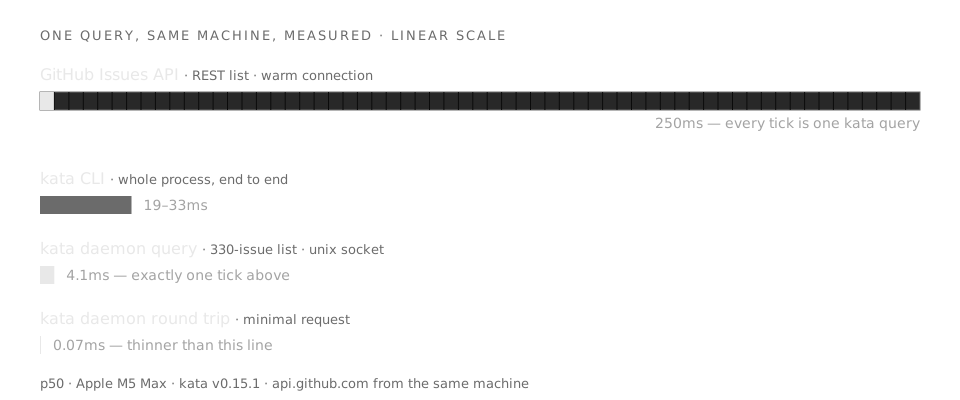
per_page=50) from the same machine over a warm connection.KATA_HOME. Your repo commits only a small, secret-free .kata.toml.02 / Memory
Chat context gets compacted. Markdown plans go stale in abandoned worktrees. kata is where agents write their state as they work, and where the next session finds it: run kata list cold and you know where the last session stopped.
Durable notes
Comments capture decisions, partial attempts, and remaining work. Write them before a long pause, a compaction, or a handoff, and whoever resumes reads them first.
Planning state
A future kata schedule gates work until its date. A deadline presses without parking. someday shelves an idea without losing it. All of it is state the queue understands.
Structure
Parent/child hierarchy, --blocks and --blocked-by ordering, --related for context. ready reads the graph and only surfaces work with no live blockers.
Events
Every mutation lands on a durable, cursor-addressable event stream. Resume from your cursor, or kata events --tail to watch the ledger live.
03 / Coordination
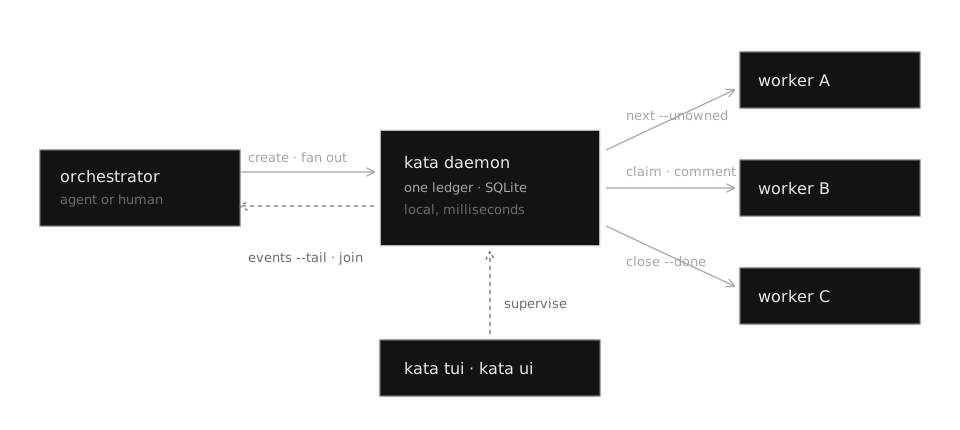
Several agents on one machine, coordinating through the ledger at loop speed: an orchestrator fans work out as child issues, workers claim and close them, and the event stream joins results back. A busy run makes hundreds of tracker calls per task. At 4ms each that costs half a second. Try it against a rate-limited API 250ms away.
Claim flow
kata next --unowned applies shared priority rules and returns at most one candidate. kata claim fails if another worker got there first; the loser runs next again and takes different work.
Fan out / join
Create children under a tracking issue, launch agents on their own branches, then follow kata events --tail to return the moment a sub-task closes or needs a human.
Handoff
kata unassign releases ownership with a comment explaining why. Labels like needs-review and handoff route work between agents and sessions mid-stream.
Attention hooks
kata init --with-hooks installs session lifecycle hooks for Claude Code and Codex, so the ledger knows which issues actually have an agent on them right now.
04 / Discipline
Agents finish confidently and wrongly. In kata, closing an issue is a claim someone can check: a reason, real prose, typed evidence, an attributed actor. Reviewers replay the closes that look lazy and reopen the ones that don't hold up.
Evidence
kata close --done takes --commit, --test, and typed --evidence, so "done" points at a verifiable artifact instead of a feeling.
Attribution
Humans and agents write to the same ledger under distinct identities. When five workers share a project, the history says who did what.
Review
kata audit closes replays close activity; kata reopen undoes the ones that don't survive review. The daemon refuses to close a parent over open children.
Idempotency
Search-before-create is the contract, and idempotency keys make creation safe to retry. A crashed agent run resumes instead of littering the ledger.
05 / Supervision
The agents write; you read the same ledger. kata tui keeps triage in the terminal. kata ui opens a full browser workspace with projects, collections, relationships, recurrences, and issue editing, served straight from the daemon.
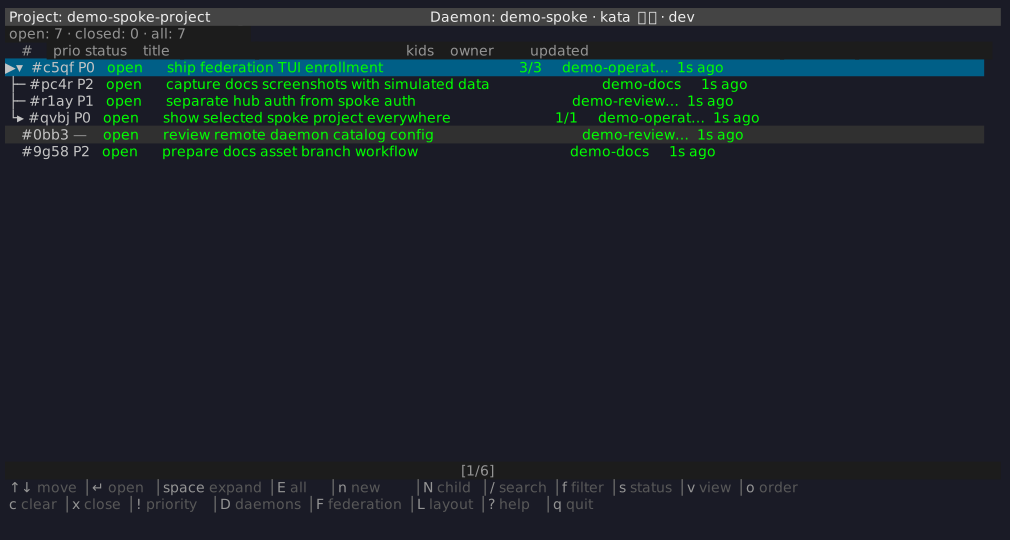
kata tui: triage without leaving the terminal.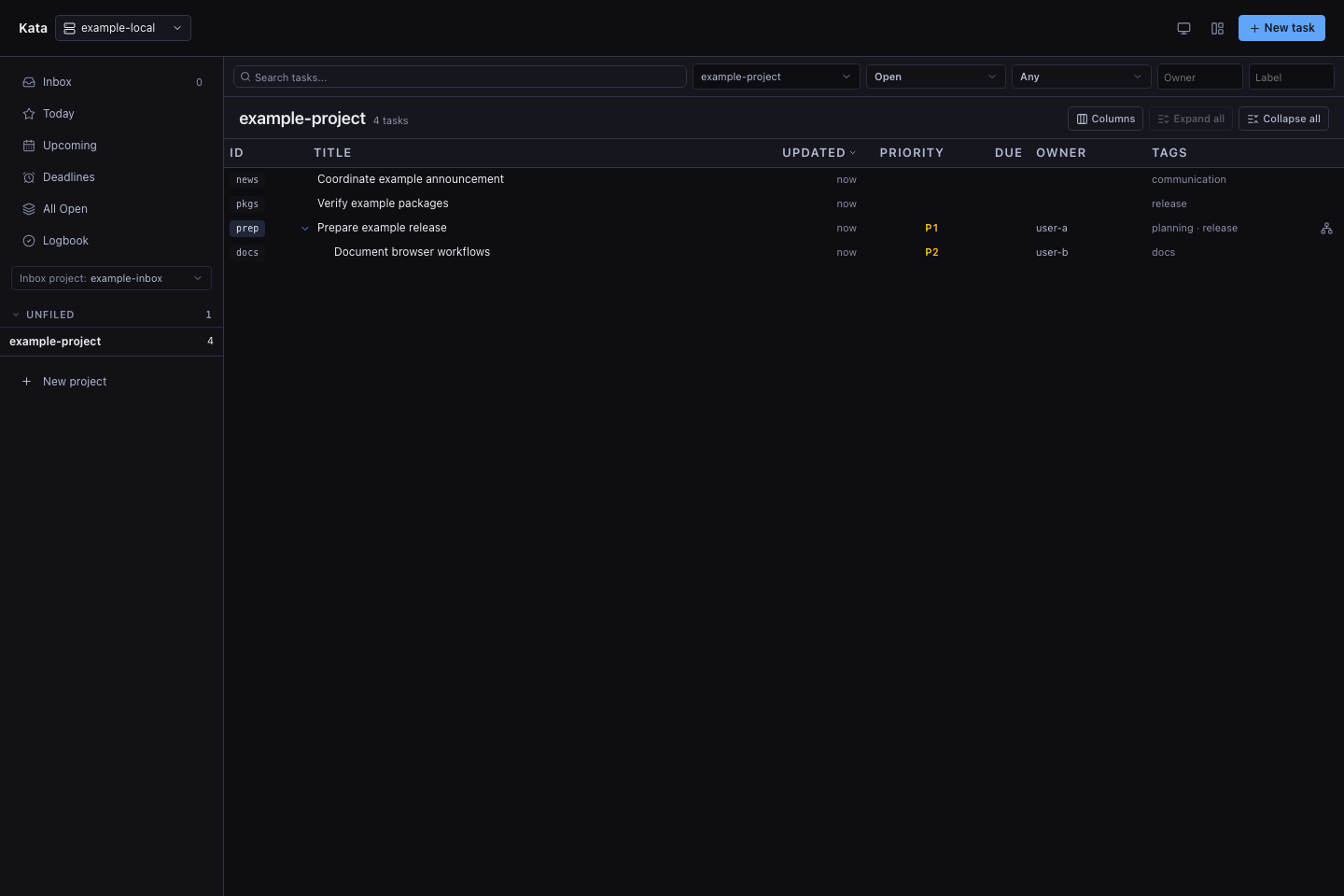
kata ui: the browser workspace. Captures use synthetic data.06 / Interfaces
The daemon owns the data and serializes every mutation. People, scripts, and agents pick the surface that fits the task and work against the same record.
--agent and --json output modes built for automation.go.kenn.io/kata runs the whole service in-process.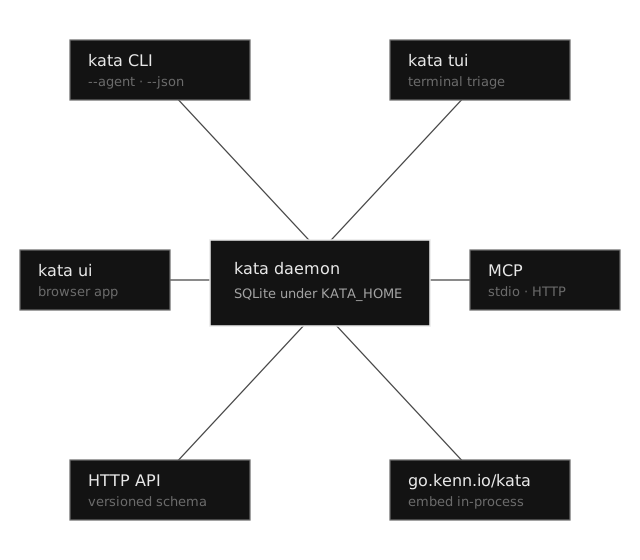
07 / Sync
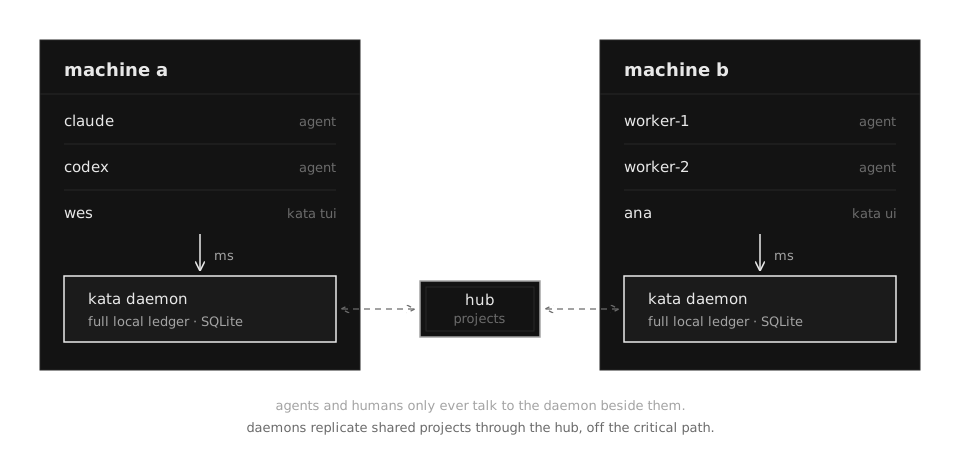
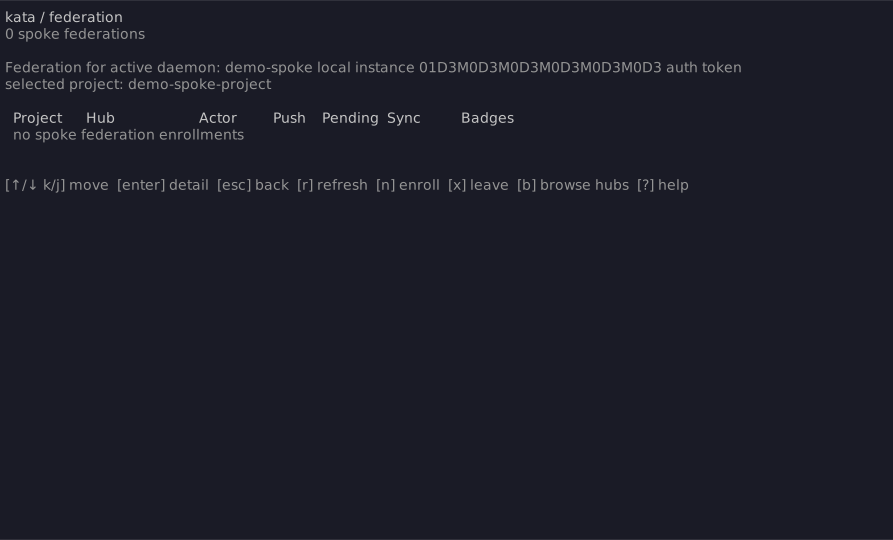
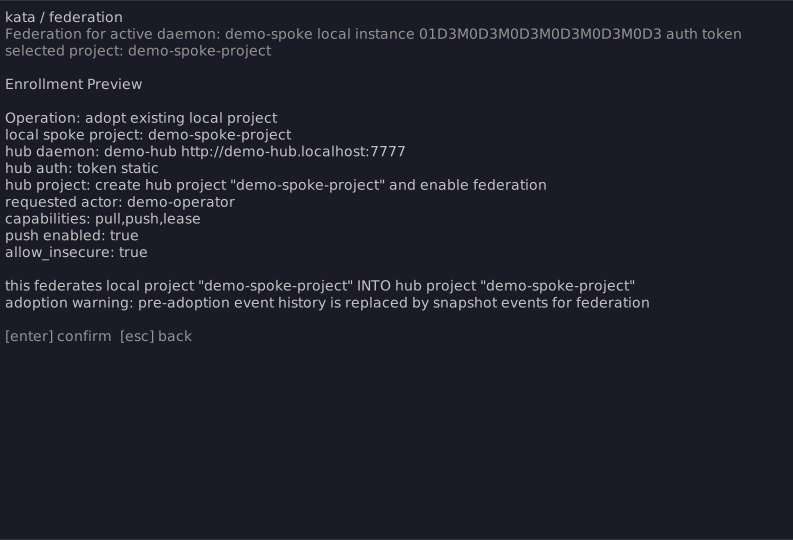
Spread agents across machines and you would normally give up the local loop. Federation keeps it: every machine runs its own daemon, every agent talks to the daemon beside it, and the daemons replicate shared projects through a hub in the background. The network still exists. It just sits between daemons now, where nobody is waiting on it.
08 / Reach
When the ledger does need to travel, every hop is explicit. Serve one daemon to a private network, mirror GitHub issues in, share one machine between actors, or run hosted. The browser workspace supervises several configured daemons from one tab.
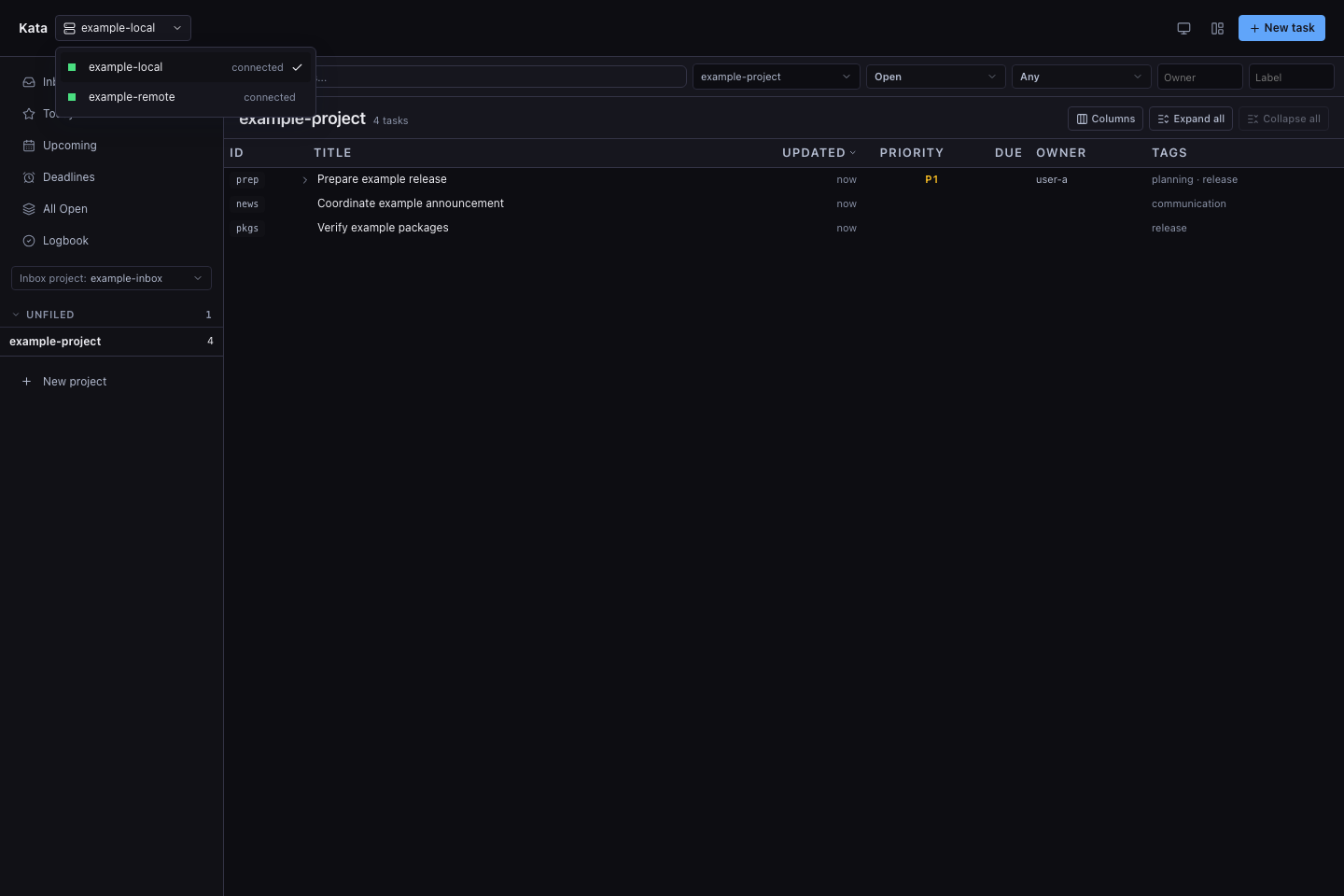
Private network
Serve the ledger over a tailnet or LAN with bearer auth. Clients point KATA_SERVER at it and keep the same CLI, TUI, and agent workflows.
GitHub sync
Mirror a repository's GitHub issues into kata so agents triage and reference upstream work at local speed.
Shared local
Several users, or a fleet of agents, share one host and one project through the same daemon. Every mutation names its actor.
Hosted
The daemon speaks the Heroku-style $PORT contract and runs on Cloud Run, Fly.io, Render, or Railway, with PostgreSQL when SQLite isn't enough.
09 / Boundary
SaaS trackers coordinate companies. kata coordinates the machine doing the work. Keep roadmaps, stakeholders, and reporting in the hosted tracker. Give the working loop a ledger that answers in 4 milliseconds.
SaaS tracker
Roadmaps, cycles, dashboards, permissions. Built for people typing into browsers, and 250ms away from the code.
Markdown plan
A plan file has no claims, no events, no evidence, and no second reader. It dies with the branch or the context window that wrote it.
kata
Operational work state inside the development runtime. Agents think with it, reviewers audit it, and you own the database.
10 / Start
A kata is a form you practice until you stop thinking about it. The guide walks the loop from bind to own; the docs carry exact commands, configuration, and architecture. kata init --with-agents teaches the form to every agent in your repo.